Worlds
01
Image to Location
Place virtual actors into physical environments. Establish single-location consistency and film multiple shots in a room without things disappearing.
01Seedance 2.5
Generate jaw-dropping AI videos with Seedance 2.5 before it's available anywhere else.
Reel
02Overview
Seedance 2.5 is shaping up to be the most anticipated release in AI video. It's the expected next step for ByteDance's Seedance line, the same line whose 2.0 release took the #1 spot on the Artificial Analysis Video Arena in early 2026, leading both text-to-video and image-to-video at once. ByteDance still hasn't put out an official 2.5 spec as of mid-2026, but between the reporting, the leaks, and the obvious 1.0 → 1.5 → 2.0 march, the direction is hard to miss: a real step up, not a minor patch.
What people are hearing is that 2.5 blows past today's ceiling. The chatter points to as much as 4K output, where current generations top out around 720p and 1080p; generation quick enough to feel near-instant; clips that run past the roughly 15-second wall; characters that stay consistent from one session to the next without you re-uploading references every time; and a lot more you can feed in at once: many reference images plus audio and video, all in a single pass.
The part that isn't a rumor is the ground it stands on, and you can put it to work in ArtCraft right now through Seedance 2.0: audio that's generated jointly with the picture and lands in sync, accurate lip-sync across languages, multi-shot stories that keep a character and a style intact through every cut, precise camera control, and a reference mode that anchors a generation to your own images, video, and audio. Every one of those is exactly what 2.5 is expected to push further, and the moment it's out, it'll be in ArtCraft.
One thing worth remembering through all of this: in ArtCraft a video model is never a black box you toss a sentence into and cross your fingers. It's one stage of a pipeline you direct: set up the scene, place your references, frame the camera, then hand the shot off. A better model just makes that last step better. The control is still yours.
To be clear: Seedance 2.5 isn't out. Anything specific on this page (numbers, speeds, lengths) is our read on the rumors, not a promise from ByteDance, and it can change the day it actually ships.
03Prompt tips
A few habits that pay off with Seedance today, and will carry right over to 2.5 when it arrives.
01
Treat the prompt like notes to a crew. Call the shot, the move, and the action separately, a short beat at a time, instead of one long wish that the model has to untangle.
02
Bring in your own images and footage and be explicit about what each is for. A reference you've chosen beats a paragraph of adjectives trying to conjure the same thing.
03
Compose your opening shot in ArtCraft first (layout, characters, camera) and let the model animate from something solid. Generations grounded in an actual frame drift far less.
04
Give the model clear, consistent looks at your subject from a few angles. The more grounded it is up front, the better your character holds together across a multi-shot sequence.
04FAQ
Both, a little. The Seedance line is real and very good, so a 2.5 is a safe bet eventually. But as of now there's no official announcement and no published spec. Everything you've read about it, including on this page, is informed speculation. We've flagged it as such rather than dress rumors up as a feature list.
We don't know, and anyone giving you a hard date is guessing. The moment ByteDance ships it and we can integrate it, it goes into ArtCraft, and we'll update this page. Until then, you're not waiting on us: the current Seedance is already here.
Build the workflow now so you're fast when 2.5 lands. Seedance 2.0 is in ArtCraft today with the features 2.5 is expected to extend: synced audio generated with the video, multi-language lip-sync, multi-shot scenes that hold a character and style across cuts, precise camera control, and reference mode. Direct your shots with those instead of one-off prompts, and the habits transfer straight to the next model.
Because a browser tab gives you a prompt box and a paywall. ArtCraft gives you the whole stage: compose with images and 3D, lock your characters, frame the camera, then generate. You also keep your work. It's a desktop app you own, not a subscription you rent.
Yes. New models are added alongside the ones you already use. Nothing you've made disappears, and you choose which model runs each generation. When 2.5 is available you can switch to it where it helps and keep everything else exactly as it is.
Manifesto
05Studio features
Text prompting is neat, but artists crave control. Compose the shot yourself — then let the model render it.
Worlds
01
Place virtual actors into physical environments. Establish single-location consistency and film multiple shots in a room without things disappearing.
3D Compositing
02
Use images, backdrops, foreground elements, and props in scenes with real depth. A couple of images blends naturally into a finished composition.
2D Compositing
03
Combine images, background removal, layers, and simple drawing tools to compose a scene exactly the way you imagined it.
3D Mesh
04
Turning images into 3D helps position elements exactingly. Block complex scenes with intentional geometry instead of fighting prompts.
Mixed Assets
05
Combine image cutouts, worlds, and 3D meshes in one canvas to lay out scenes with precision and intention.
Posing
06
Dynamically pose your characters to nail the precise character, scene, and camera blocking before calling "action".
Cutouts
07
Instantly remove backgrounds from images to create assets for your scenes. Clean, precise, and ready for compositing.
More in the app
08
app.getartcraft.com
Generate, edit, and compose with every model — right in your browser, no install needed.
06Ownership
ArtCraft is yours to own and keep, forever. No subscriptions needed, no aggregator middleman, no rent payments.
A
The whole studio is on GitHub. Read it, fork it, make it yours.
View sourceB
ArtCraft is yours to own and keep, forever. No rent payments.
C
No aggregator between you and the models. Your work stays yours.
07Why ArtCraft
Control
01
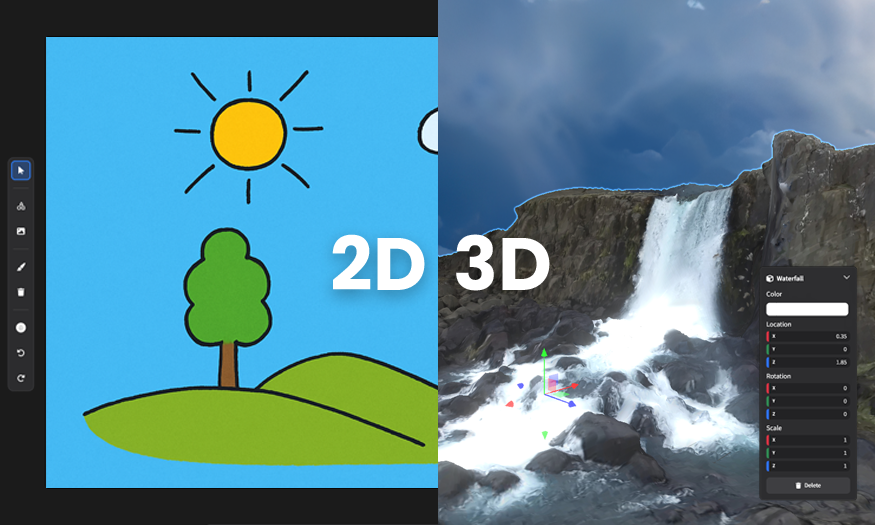
Create images and videos with our easy-to-use AI tool. Draw on a canvas or work in a 3D space as if you’re playing a video game.
Desktop
02
No more hunting for the hundredth tab. Works on Windows, Mac, and soon Linux and tablets. First class experience for real artists.


Open source
03
Our desktop app’s code and infrastructure are all open source on GitHub. Join us and contribute!
Models
04
You’ll be able to use every image and video model all in one place. Log in with your existing subscriptions.
 Seedance 2.0
 GPT Image 2Sora 2 Pro
 Grok Video
 Nano Banana 2GPT Image 1.5
 Qwen Edit 2511Grok Imagine 1.5Nano Banana Pro
 Flux Pro 1.1 UltraSeedream 4.5
 Marble 0.1 Plus
 Hunyuan 3D 3.0Flux Pro Kontext Max
 MiniMax H3
 Kling 3.0 ProGoogle Veo 3.1
 MidjourneyKling 2.6 ProSeedance 1.5 ProGoogle Veo 3 FastKling 2.5 Turbo Pro
Makers
05
The other leading platforms were created by the Google ad team, crypto bros, and other non-artists. Not us. We’re one of you.
08Proof
01
02
03
Community
ArtCraft is open source and community-driven. Come build with us.
Free to download
Join thousands of artists and filmmakers using ArtCraft to bring their vision to life.